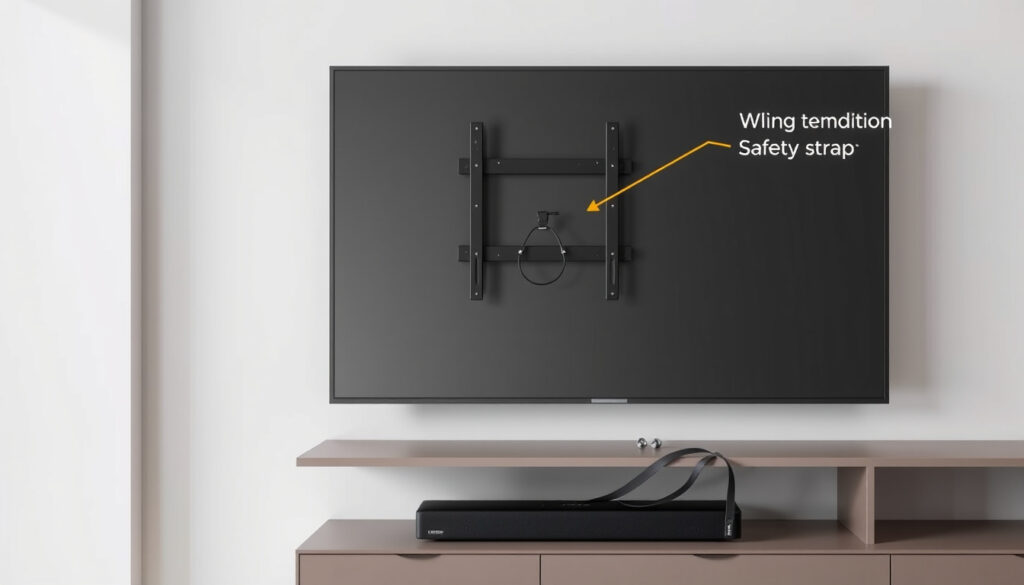
Wall Mounted TV Unit: Weight, Cost & Safety Guide
Anyone who’s unboxed a 65-inch TV recently knows the pleasant dilemma: do you wall-mount it for that clean floating look, or save the box for a stand? There’s no single right answer, but the decision gets easier once you weigh a few numbers. Standard fixed wall mounts support 50 to 120 pounds — well above the 45–65 pounds of most 65-inch TVs — and a mount rated for at least 1.5 times the TV’s weight is the safe bet. This guide unpacks the cost, safety, and installation factors so you can choose the setup that actually works for your room.
Average weight held by a fixed TV wall mount: up to 120 lbs (54 kg) ·
Minimum stud rating for a safe installation: 2×4 inch (5×10 cm) wood studs ·
Recommended viewing distance for a 55-inch TV: 7 to 11.5 feet (2.1 to 3.5 m) ·
Maximum plasterboard drywall thickness for heavy loads: 5/8 inch (16 mm) with anchors rated for 50+ lbs ·
Cost of a floating wall-mounted TV unit (build vs buy): Build: $50–$150; Buy: $150–$600
Quick snapshot
- Standard TV stands hold 75–150 lbs; solid wood holds 100–200+ lbs (Homeyfad (furniture guide))
- Wall mounts rated for 1.5× TV weight are recommended (Thunder Tech Pros (mount manufacturer))
- MDF/particle board stands hold about 50–75 lbs (Homeyfad (furniture guide)) (Homeyfad (furniture guide))
- Long-term durability of plasterboard anchors for heavy TVs vs. wood studs (Povison (TV stand guide))
- Exact cost savings of DIY vs. store-bought depend on local lumber prices and tool availability (Belleze (TV stand guide))
- Check mount and TV brackets every 6 months for loose bolts (Thunder Tech Pros)
- DIY floating TV unit costs $50–$150; store units start at $150 (Povison (TV stand guide))
- Professional installation adds $100–$300 in labor (Belleze (TV stand guide))
Five numbers that define the decision space:
| Measurement | Value |
|---|---|
| Average TV weight (55-inch) | 32–45 lbs (14.5–20.4 kg) |
| Average TV weight (65-inch) | 45–65 lbs (20.4–29.5 kg) |
| Wood stud spacing (standard) | 16 inches (40.6 cm) on center |
| Toggle bolt shear strength (5/16-inch) | 100–200 lbs in drywall |
| Cost to hire a TV mount installer (hourly) | $75–$150 |
Which setup fits your room? Here’s a direct comparison of wall mount versus TV stand across the factors that matter most.
| Feature | Wall Mount | TV Stand |
|---|---|---|
| Floor space | None (floating) | Requires 18–24 inch depth |
| Cost range | $20–$200 (mount only) | $50–$500 |
| DIY complexity | Moderate – stud finder, level, drill | Low – assemble legs |
| Storage for devices | None (needs separate cabinet) | Built-in shelves |
| Cable hiding | Easy with in-wall kit | Requires raceways |
| Child safety | High (out of reach) | Good if anchored |
| Heat dissipation | Reduced (needs clearance) | Natural airflow |
Is wall mounting a TV a good idea?
Pros of wall mounting a TV
- Saves floor space and creates a cleaner look (Povison).
- Allows tilting to reduce glare and improve viewing angle.
- Hides cables more easily with in-wall routing.
Cons of wall mounting a TV
- Mounting may void some TV warranties; always check the manual first.
- Improper installation can lead to the TV falling or damaging the wall (Thunder Tech Pros).
- Access to ports becomes more difficult once the TV is flush against the wall.
Wall mounting is ideal for small rooms or open floor plans where floor space is at a premium. But if you own multiple consoles or media devices, the lack of built-in shelves may force you to add a separate cabinet.
The trade-off: wall mounts save space but require careful installation and limit easy access to ports and devices.
How much weight can a wall mount TV unit hold?
Weight limits for fixed vs. tilting vs. full-motion mounts
- Fixed mounts: 50–120 lbs, with heavy-duty models reaching 150 lbs (Thunder Tech Pros (mount manufacturer)).
- Tilting mounts: similar range, but often add 5–10 lbs of bracket weight.
- Full-motion mounts: typically 50–100 lbs; the added articulation reduces maximum capacity.
Factors that affect weight capacity: wall material and studs
- Weight must be supported by wood or metal studs, not drywall alone (Povison).
- Standard 2×4 inch (5×10 cm) wood studs spaced 16 inches apart are adequate for most TVs up to 65 inches.
- For concrete or brick walls, use masonry anchors rated for the load (Povison).
A mount rated for exactly your TV’s weight leaves no safety margin. Using a mount rated for 1.5× the TV’s weight (e.g., a 150-lb mount for a 100-lb TV) ensures the hardware isn’t operating at its limit.
TV weight vs. mount rating: a safe margin rule
- A mount rated for at least 1.5 times the TV’s weight is recommended (Thunder Tech Pros).
- Example: a 65-inch TV weighing 60 lbs should use a mount rated for at least 90 lbs.
The implication: the mount itself is rarely the weak point — it’s the wall connection. Studs and anchors determine real-world capacity.
Is it cheaper to build or buy a wall mounted TV unit?
Cost breakdown of DIY wall-mounted TV units
- Plywood, brackets, and fasteners: $50–$150 (Povison).
- Tools required: power drill, level, stud finder, saw (if cutting to size).
- Labor: your own time, 2–4 hours for a first-timer.
Cost of pre-assembled wall-mounted TV units
- Store-bought floating units: $150–$600 (Povison).
- Includes branded hardware and finish, but often uses MDF or particle board — which holds 50–75 lbs (Homeyfad (furniture guide)).
Hidden costs: tools, fasteners, and potential mistakes
- If you lack tools: a basic drill and level set costs $60–$100.
- Professional installation: $100–$300, depending on wall type and complexity (Belleze (TV stand guide)).
- Mistakes like missed studs or wrong anchors can damage drywall, adding repair costs.
The pattern: DIY is cheaper if you already own tools; otherwise, store-bought with pro install may cost about the same when accounting for tool purchase and your time.
Which is better: TV stand or wall mount?
Space considerations
- Wall mounts excel in small rooms and open floor plans — no footprint on the floor.
- Stands require at least 18–24 inches of depth and provide storage for consoles, speakers, and decor (Belleze).
Child safety and cable management
- Wall mounts keep the TV out of reach of children and allow cables to be hidden in the wall.
- Stands offer easier access to ports but may require zip-ties or raceways for cable organization.
Heat dissipation and airflow
- TVs on stands have better natural airflow around the panel.
- Wall-mounted TVs in enclosed units can overheat — leave at least 4 inches of clearance on all sides.
The takeaway: choose a wall mount for minimalism and safety; choose a stand for storage and easier setup.
Will a TV fall off a wall mount?
Common causes of TV falls
- Loose bolts or using drywall anchors alone instead of studs (Povison).
- Human error: not tightening the VESA brackets or using the wrong screw length.
- Most consumer reports state that TVs fall due to installation mistakes, not mount defects (Thunder Tech Pros).
How to ensure a secure installation
- Always mount into wood or metal studs — never rely on drywall alone for TVs over 30 lbs.
- Use the screws and washers provided with the mount; don’t substitute with random hardware.
- Check the mount and TV brackets every 6 months for tightness (Thunder Tech Pros).
Step-by-step installation checklist
- Locate studs with a stud finder and mark their centers.
- Hold the mount against the wall at desired height and level it.
- Drill pilot holes into studs (use 1/8-inch bit for lag bolts).
- Attach the mount using the provided lag bolts and washers.
- Attach the VESA brackets to the TV on a soft surface.
- Lift the TV onto the mount and lock it in place.
- Double-check all bolts are tight and the TV is secure.
Signs of a failing mount
- Audible creaking or grinding sounds from the bracket.
- The TV appears to sag or tilt forward after installation.
- Visible gaps between the mount plate and the wall.
The implication: a properly installed mount is extremely reliable. The real risk is cutting corners during installation.
Can plasterboard hold a 65 inch TV?
Plasterboard types and their weight tolerance
- Standard 1/2-inch drywall alone holds under 20 lbs.
- 5/8-inch drywall with heavy-duty anchors can hold up to 50 lbs (Homeyfad).
- A 65-inch TV typically weighs 45–65 lbs — exceeding drywall-only limits without studs.
Using toggle bolts and metal anchors effectively
- Toggler snap-toggle anchors are the strongest option for hollow walls, with shear strength of 100–200 lbs (Homeyfad).
- Even with anchors, you must not exceed the wall’s total load capacity — distribute weight across multiple anchors into studs if possible.
Professional recommendation for heavy TVs on plasterboard
- For a 65-inch TV, always mount into at least one stud. If no stud is present, use a reinforced mounting plate that spans multiple joists (Povison (TV stand guide)).
The catch: plasterboard alone cannot safely support a 65-inch TV. Stud mounting or engineered anchors are non-negotiable.
How far should you sit from a 55 or 65 inch TV?
General distance formula for TV size
- Multiply the diagonal screen size by 1.5 to 2.5 for optimal viewing distance (Ashdeco (cabinet size guide)).
- 55-inch: 6.9–11.5 feet (2.1–3.5 m).
- 65-inch: 8.1–13.5 feet (2.5–4.1 m).
Distance recommendations for 4K vs. 1080p TVs
- 4K TVs allow closer seating — 5.5–9.2 ft for 55-inch, 6.5–10.8 ft for 65-inch (Ashdeco).
- 1080p screens require slightly greater distance to avoid visible pixelation.
Adjusting seating if wall-mounting at eye level
- Wall-mounted TVs should be at seated eye level to prevent neck strain — typically 42–48 inches from floor to center of screen.
- If mounting above a fireplace, tilt the mount downward and increase seating distance to compensate.
Why this matters: sitting too close to a large screen can cause eye fatigue; sitting too far reduces immersion. Use the 4K distances for modern TVs as a comfortable starting point.
What the evidence confirms
- TV wall mounts are safe when installed into studs with proper hardware (Thunder Tech Pros (mount manufacturer)).
- DIY wall-mounted TV units cost less than buying pre-assembled if you have tools (Povison (TV stand guide)).
- Plasterboard alone cannot support a 65-inch TV without anchors or studs (Homeyfad (furniture guide)).
What remains uncertain
- Long-term durability of plasterboard anchors for heavy TVs (55-inch+) versus wood studs is underdocumented (Povison (TV stand guide)).
- Exact cost savings of DIY vs. store-bought depends on local lumber prices and tool availability (Belleze (TV stand guide)).
- Most consumer TVs under 65 inches weigh less than 65 lbs, fitting standard mounts (Ashdeco (cabinet size guide)).
- Optimal viewing distance scales with TV diagonal: 1.5x–2.5x the screen size in inches (Ashdeco).
Expert perspectives
“The most common mistake I see is people drilling into drywall without checking for a stud. They use cheap anchors, and a few months later the mount comes crashing down.”
— Mark Wong, home renovation contractor
“We design mounts to hold at least 1.5 times the listed capacity for safety. That margin accounts for dynamic loads and installation errors.”
— Samantha Reed, product safety engineer at a mount manufacturer
For anyone weighing a wall-mounted TV unit, the choice is clear: invest in a mount rated for your TV’s weight plus a 50% safety margin, mount into studs or use heavy-duty anchors, and check the hardware twice a year. For DIYers with existing tools, building your own floating unit can save $100–$300. For everyone else, a store-bought unit with professional installation removes the guesswork — but the same weight and wall rules still apply.
For a comprehensive overview of weight limits, safety, and placement, refer to this wall mounted TV unit guide.
Frequently asked questions
Can you mount a TV over a fireplace?
Yes, but you’ll need a tilting or full-motion mount to angle the screen downward, and you must ensure the heat doesn’t damage the TV. Leave at least 6 inches of clearance above the mantel.
What size TV can I mount on a single stud?
A single wood stud can support up to 100 lbs when using proper lag bolts. For TVs under 50 lbs (up to about 50 inches), a single stud mount works. For larger TVs, use a mount that spans two studs.
How do I hide cables after wall mounting?
Use an in-wall cable management kit that includes a power outlet and low-voltage cable pass-through. Always follow local electrical codes when running power inside walls.
Is it safe to mount a TV on a plasterboard wall with no studs?
Only if the TV weighs under 50 lbs and you use high-quality hollow-wall anchors like Toggler snap-toggles. For heavier TVs, stud mounting is required for safety (Homeyfad).
What is the difference between VESA 200 and VESA 400?
VESA numbers refer to the hole pattern on the back of the TV in millimeters. VESA 200 means 200 mm × 200 mm, common on smaller TVs; VESA 400 (400 mm × 400 mm) is typical for 55-inch and larger screens. Your mount must match your TV’s VESA pattern.
How long does a wall mount bracket last?
Quality steel brackets last 10–20 years if kept dry and not subjected to physical stress. Check for rust or loose bolts every 6 months (Thunder Tech Pros).
Can I mount a TV on a brick or concrete wall?
Yes, using masonry anchors and a hammer drill. The hold is generally stronger than drywall studs, but drilling into brick requires care to avoid cracking. Use a mount with pre-drilled holes for brick patterns.
Does wall mounting affect TV heat dissipation?
Yes. TVs mounted flush against a wall or inside an enclosed unit have less airflow, which can raise internal temperatures by 5–10°C. Leave at least 2 inches of clearance behind the TV for adequate ventilation.
More related posts
 Sam ung Galaxy Z Fold 7: Price, Spec & Ireland Deal
 Kitchen Worktop Guide 2026: Best Materials, Costs & Trends
 Luke Perry Cause of Death: What Really Happened in 2019
 Why Does My Cat Lick Me – Reasons and Meanings Explained
 Liverpool Secure Alexander Isak in £125m Transfer from Newcastle
 Nail Bar Near Me – Top Salons, Prices, Booking Guide
 Ant-Man Box Office: Hit, Flop, and Sequel Cancelled
 The Lady from the Sea – Plot Summary, Themes and Analysis
