British Gas Meter Reading: Complete Submission Guide
If you’ve ever stared at your gas meter and wondered whether you’re reading it right, you’re in good company. British Gas customers with standard credit meters can submit readings through multiple channels — online, by phone, or via the app — and getting those numbers right matters more than most people realise.
Official online submission URL: www.britishgas.co.uk/meterreads · Meter reading phone number: 0333 202 9802 · Submit without account: Yes, online · Business meter submission page: www.britishgas.co.uk/business/help-and-support/connections-meters-readings/submitting-my-meter-reading · Ultimate meter read guide: www.britishgas.co.uk/help-and-support/meters/how-to-read-your-meter
Quick snapshot
- British Gas accepts readings via online account, mobile app, phone automated service, or web form without account (British Gas official meter reads page)
- Precise app version requirements or official download links for British Gas Energy app — download via standard app stores (British Gas YouTube demo video)
- Submit readings within 14 days before or after Ofgem price cap change dates to avoid billing issues (British Gas guidance on timing)
- Meter reading history updates in your online account within a few days of submission (British Gas source article on reading updates)
Key contact details and submission options for British Gas gas meter readings are summarised in the table below.
| Field | Value |
|---|---|
| Primary submission page | www.britishgas.co.uk/meterreads |
| Meter reading guide | www.britishgas.co.uk/help-and-support/meters/how-to-read-your-meter |
| Phone for readings | 0333 202 9802 |
| Online no account needed | Yes |
| Business submission | www.britishgas.co.uk/business/help-and-support/connections-meters-readings/submitting-my-meter-reading |
How do I submit metre readings to British Gas?
British Gas offers four distinct channels for submitting your gas meter reading. The official meter reads page confirms you can use your online account, the mobile app, an automated phone line, or a web form that requires no account at all. Smart meters and prepayment meters transmit readings automatically, so customers with those devices don’t need to submit manually.
Online submission process
- Visit www.britishgas.co.uk/meterreads directly
- Log in with your British Gas account credentials, or select the option to submit without an account
- Enter your meter reading (the numbers from left to right, including leading zeros, ignoring any decimal point)
- Confirm and submit — the system processes your reading immediately
Required account details
For account holders, you’ll need your customer account number and the actual meter reading. The British Gas Help Support page confirms that no account is needed for the basic web form submission, making this accessible even for friends or family members helping a customer who lacks internet access.
Submitting for others
British Gas allows you to submit meter readings for friends and family through your own account. According to the official guidance, you can manage readings for multiple accounts under your login, which proves useful for caregivers or landlords managing properties.
The implication: regular submissions protect you from estimated bills that could overcharge you for energy you never used.
How do I read my British Gas gas meter?
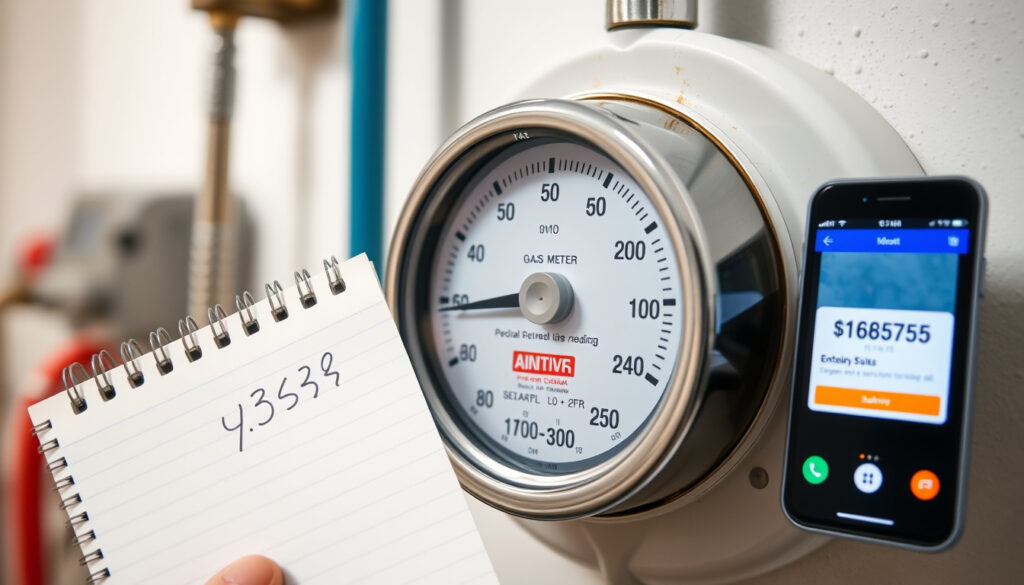
Before you can submit a reading, you need to actually read the thing correctly. The British Gas Source Article provides the official method: write down the numbers from left to right, include any leading zeros, and ignore any decimal point or numbers shown after it. That’s it — the red dial sections and anything past the decimal are not part of your billable reading.
Steps for digital gas meters
- Locate the digital display on your meter — it should show a row of numbers
- Read from left to right across all the digits displayed
- Include any zeros at the start (these matter for the reading)
- Skip anything after the decimal point — those are decimal fractions not used for billing
- Note the reading down before heading to submit it
Identifying correct numbers
The British Gas meter read guide emphasises that only the main row of numbers counts. If your meter has multiple display modes (such as M3 for cubic metres of gas), make sure you’re noting the correct index your tariff uses.
Common meter types
Credit meters require manual reading submission. Prepayment meters operate differently — you top up in advance and the meter deducts as you use gas. Smart meters (if yours is connected) handle this automatically. The British Gas official page confirms that only non-smart, variable tariff credit meter customers need to submit regular readings.
What this means: if you’ve got a smart meter doing its job, you can essentially forget about meter readings — British Gas receives them automatically.
Can I submit meter reading online?
Yes — and according to British Gas’s own video guide, the online route via the Energy app or your online account is the quickest method available. The credit meter online submission page provides dedicated instructions for this process.
British Gas online portal
- Log into your account at www.britishgas.co.uk/meterreads
- Navigate to the meter readings section
- Select “Submit a reading” and enter your meter serial number if prompted
- Input the numbers you’ve recorded from your meter
- Submit and note the confirmation for your records
Login or no-login options
You have two paths: registered account holders log in for a streamlined experience with saved details, while the British Gas Help Support page confirms that an account isn’t strictly required — you can use the guest form with minimal details.
Credit meter specifics
Credit meters (the standard type for customers not on prepayment) require active reading submission to avoid estimated billing. The British Gas Meter Reads Page makes clear that without your readings, the supplier estimates consumption — estimates that could swing either direction and leave you overpaying or underpaying.
The catch: estimated bills work both ways, but if British Gas underestimates your usage, you risk a large catch-up bill later. Manual readings are your insurance against that shock.
Can I phone British Gas with meter reading?
Absolutely — British Gas operates automated phone lines specifically for meter reading submission. The official meter reads page confirms the phone submission service uses an automated system that requires your customer account number and the meter reads themselves.
Phone number and hours
For general billing and meter reading enquiries, call 0333 202 9802. If your account number starts with “A” or “BGX”, a different line applies: 0330 054 5340. Both numbers connect you to British Gas’s automated service available around the clock for meter reading submissions.
What to prepare
- Your British Gas customer account number (starts with a letter followed by digits)
- The meter reading you recorded from your gas meter
- Your postcode (the system may ask for this to verify your account)
Billing enquiries line
The British Gas contact options page lists the full range of phone channels. For meter readings specifically, the automated service handles submissions without needing to speak to an advisor — useful if you prefer phone but don’t want to wait on hold.
The trade-off: phone submission works well as a backup when you can’t access the website or app, but it demands you have your account number to hand — something you might not remember off the top of your head.
What are buttons A and B for on a gas meter?
Smart gas meters feature buttons that let you scroll through different readings and display modes. The Citizens Advice guide provides specific instructions for the various button configurations British Gas customers may encounter.
Function of meter buttons
Buttons A and B serve navigation purposes — they cycle through your meter’s different display screens. Depending on your meter model, these might be labelled A/B, or you might have red buttons or a circular keypad. The Citizens Advice guide on smart meters covers the main variants.
When to use them
- Meters with A/B buttons: Press button A twice to display the METER INDEX M3 reading
- Meters with 3 red buttons: Press the left A button to show your reading
- Meters with circle button: Press the middle button for the reading display
- Meters with numeric keypad: Press 9 to access the VOLUME M3 reading
Digital meter navigation
Different screens show different data — consumption history, tariff information, and the actual meter index. The reading you need for British Gas billing is the M3 index (cubic metres of gas passed through). The Citizens Advice guide confirms that smart gas meters may still require a manual reading when switching suppliers, so knowing how to access yours matters.
Why this matters: if you’re switching energy supplier, your new provider needs an accurate opening reading. If your smart meter isn’t communicating properly or you’re outside its connectivity zone, you’ll need to read it manually using these buttons.
Smart meter owners can essentially ignore meter reading submissions — the device handles this automatically. But credit meter customers who skip submissions are essentially letting British Gas estimate their usage, and those estimates can stack up against you without any recourse until your next actual reading.
Business customers face tighter deadlines: opening readings must arrive within 5 days of your Supply Start Date, and final readings within 5 days of your Supply End Date. Miss those windows and you could face billing disputes that are harder to resolve retroactively (British Gas business portal guidance).
When should you actually submit a reading?
British Gas recommends submitting readings around Ofgem price cap change dates — specifically within 14 days before or after the new cap takes effect, according to the British Gas Source Article. This timing ensures your account reflects accurate consumption at the correct tariff rate when rates shift.
How often should I submit British Gas meter readings?
Submit readings regularly, ideally every month or every quarter. British Gas sends reminders via email, text, or post according to your communication preferences. The official meter reads page confirms that regular submissions keep your account accurate and your bills reflecting real usage rather than estimates.
What if my British Gas meter reading is estimated?
If you’ve received an estimated bill, submit an actual reading as soon as possible — this overrides the estimate immediately. The British Gas Business Support page notes that out-of-range readings trigger validation checks before billing, so an unusually high or low reading may prompt British Gas to contact you for confirmation before applying it.
Can I submit British Gas meter readings for multiple meters?
Yes — if you have multiple properties or meters registered under your account, you can submit readings for each one through your online account. Business customers with multiple sites should use the dedicated business portal for streamlined multi-meter management.
The pattern: three reader segments, three separate needs. Smart/prepayment meter owners: no action required. Credit meter owners with online access: submit monthly. Those without online access: phone or guest form keeps you covered.
How to read electric meter for British Gas?
While this article focuses on gas meters, British Gas customers with dual fuel accounts may also need to submit electricity meter readings. The reading process follows the same principle: left to right, including leading zeros, ignoring decimals. The British Gas meter guide covers both gas and electric meter reading instructions.
Electric vs gas reading process
- Both meters use the same digit-reading approach (left to right, ignore decimals)
- Gas is measured in cubic metres (M3), electricity in kilowatt-hours (kWh)
- Submit each meter type separately through the same British Gas portal
- Digital electric displays may show additional tariff information — focus on the main consumption index
The implication: if you’ve got both gas and electricity with British Gas, you can manage both readings in the same online session or phone call — no need for separate contacts.
What is the Priority Services Register for British Gas?
British Gas offers a Priority Services Register for customers who may need extra support accessing their meters — this includes older customers, those with medical conditions, or anyone who finds physical meter access difficult. The Citizens Advice guide suggests contacting British Gas directly if you struggle to access your meter, as arrangements can often be made for quarterly manual reads or alternative submission methods.
Eligibility and registration
If you qualify, British Gas can provide large-print bills, password-protected account access, and arranged meter reading visits. Contact British Gas through their contact options page to enquire about joining the register.
What this means: customers who find meter access physically challenging don’t have to struggle alone. British Gas has a built-in support mechanism, but you need to ask for it.
How to generate a self-bill after meter reading?
Some customers, particularly those on certain business tariffs or special arrangements, may need to generate self-bills based on their meter readings. The British Gas Meter Reads Page notes that Feed-in Tariff customers receive a dedicated meter reading form or can email readings directly through specified channels.
Self-billing process
- Record your meter reading following the standard method (left to right, include zeros, ignore decimals)
- Access the self-billing form through your British Gas business account or the Feed-in Tariff portal
- Enter your reading and confirm the billing period
- Submit and retain the reference number for your records
The catch: self-billing shifts the responsibility to you to submit readings on time. Missing a self-billed period could mean your payment falls behind, creating complications that are harder to unravel retroactively.
What British Gas says
We appreciate everyone’s got better things to do with their day than sending us a meter reading. But it means you’ll get accurate bills.
— British Gas (Energy Supplier Official Statement)
Submitting regular meter readings helps to keep your energy bills accurate.
— British Gas (YouTube Video Guide)
It’s always a good idea to send in meter readings on (or near) the day a new price cap comes in.
— British Gas (Source Article on Timing)
Related reading: Free Energy Saving Gadgets – UK Eligibility and Savings Guide · Check My Broadband Speed – Free UK Tools and Testing Guide
youtube.com, justanswer.co.uk, britishgas.co.uk, britishgas.co.uk
Accurate meter readings underpin fair British Gas billing, with this step-by-step meter reading guide offering clear steps for analogue and modern displays.
Frequently asked questions
How often should I submit British Gas meter readings?
Submit every month or at minimum every quarter. Regular submissions prevent estimated billing from building up and ensure your account always reflects your actual consumption rather than projections.
What if my British Gas meter reading is estimated?
Submit an actual reading immediately — this overrides any estimate and resets your account to accurate billing. The new reading takes effect within a few days according to the British Gas Source Article.
Can I submit British Gas meter readings for multiple meters?
Yes. You can manage multiple meters through your online account, and business customers with multiple sites should use the dedicated business portal.
How to read electric meter for British Gas?
Read left to right including leading zeros, ignoring decimals — the same method as gas meters, though electricity uses kilowatt-hours (kWh) rather than cubic metres (M3).
What is Priority Services Register for British Gas?
A free service for customers who need extra support accessing their meters. Eligibility includes older customers, those with medical conditions, or anyone with accessibility challenges. Contact British Gas to enrol.
When to send meter readings near price cap changes?
British Gas recommends submitting within 14 days before or after Ofgem price cap change dates. This timing ensures your account reflects accurate consumption at the correct tariff rate when rates shift.
How to generate self-bill after meter reading?
Access the self-billing form through your British Gas business account or Feed-in Tariff portal, enter your reading and billing period, then submit and retain your reference number.
Can I submit British Gas meter reading via app?
Yes. The British Gas YouTube Video confirms the British Gas Energy app accepts meter readings for both iOS and Android devices.
For British Gas customers, the path forward is straightforward: smart or prepayment meter owners can largely ignore submissions while their devices handle everything automatically. Credit meter customers who submit readings monthly through the online portal, app, or phone automated service keep their bills accurate and avoid the accumulated estimation risk that hits hardest when an actual read finally arrives. The cost of five minutes of reading submission now could save you from an unexpected bill shock later — and British Gas has made it easier than ever to do exactly that.
More related posts
 Merry Christmas and Happy New Year: The Facts Behind Greetings
 High Red Blood Cell Count: Causes, Symptoms & When to Worry
 James Gandolfini: Cause of Death, Weight, and Final Days
 Little Wandle Phonics: Guide for Parents and Teachers
 Roberto Martinez: Career, Teams, and Managerial Record
 Man Utd Transfer News Today Live: Baleba Rumors
 Nick Drake: Biography, Music, Death, and Lasting Legacy
 Dart Distance: Official Rules, Height & Measurements for Steel & Soft Tip
